VPS Service Business Platform
A personalized small-business operating system, built around the way your business actually works.
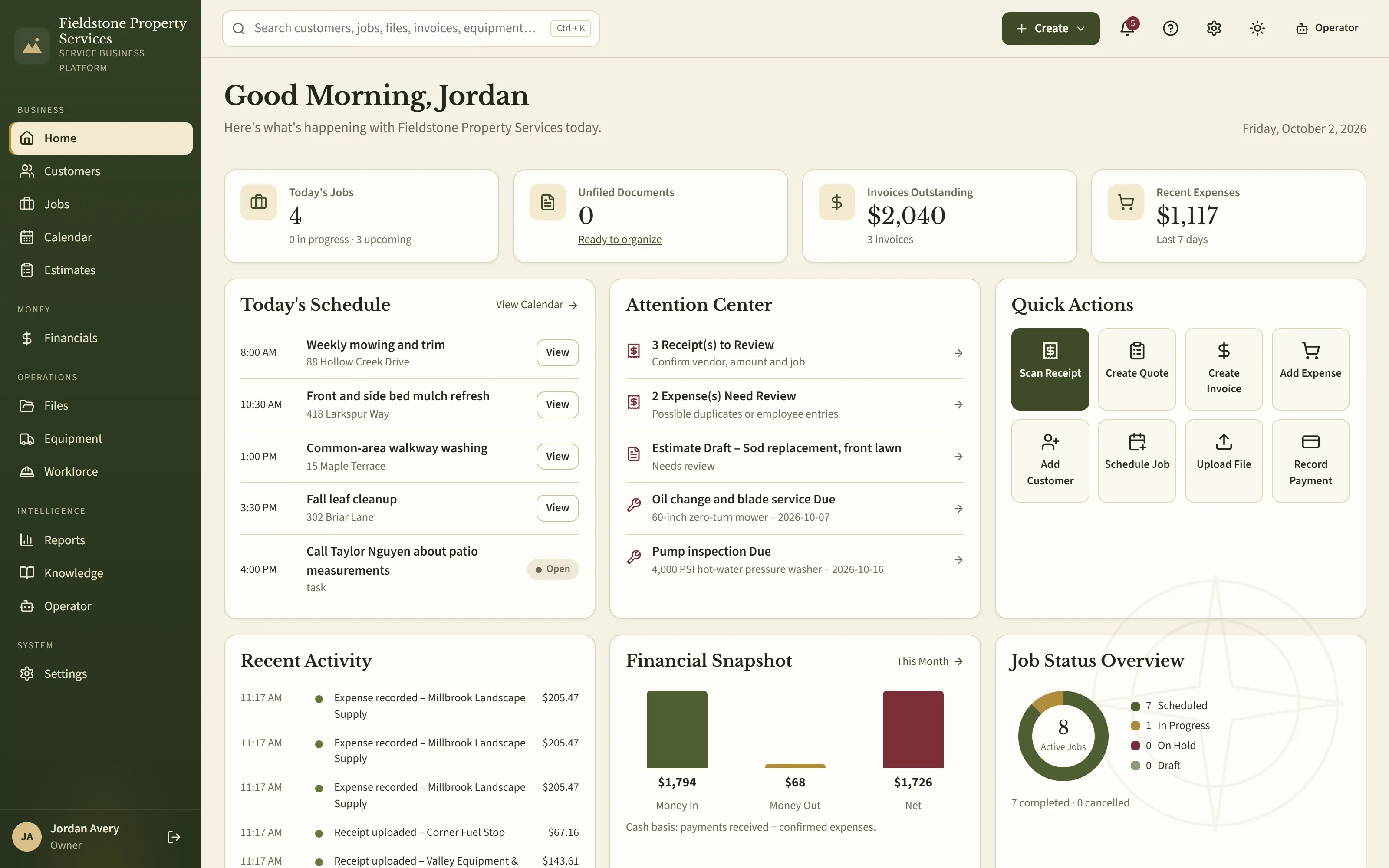
VPS brings customers, quotes, jobs, scheduling, money, files and business knowledge into one system on your own Windows PC — with optional AI assistance your business never has to depend on.
- Windows desktop software
- Local database on your PC
- Fully works with AI off
- Automatic, verified backups
Why VPS exists
Most service businesses run on a pile of tools that don't talk to each other.
Each piece works on its own — until a customer calls about last spring's job, a receipt goes missing, or the person who knows the prices is out for the day.
Customer texts
Who asked for what — and when?
Notebooks
Measurements that never make it back to the office.
Spreadsheets
Prices copied by hand into every quote.
Estimates
Which version did the customer approve?
Receipts
Faded slips in the truck at tax time.
Scheduling
One rainy day reshuffles the whole week.
Invoices
Who still owes, and for which job?
Files
Photos and documents spread across phones and folders.
Pricing & know-how
Business knowledge that lives in one person's head.
With VPS
One operating system
- Customers & leadsevery contact, property and request
- Estimatespriced from your own services and real measurements
- Calendar & jobsvisits, crews, checklists and changes
- Moneyinvoices, payments, expenses and receipts
- Filing Cabinetevery original, linked to its records
- Knowledgeyour procedures and trusted references
Not another app to add to the pile — the one place the work lives, so you enter something once and it is there wherever it is needed.
How it works
Capture it once. Use it everywhere it matters.
Every job follows one path through VPS. Each step builds on the record before it, so nothing is retyped and nothing gets lost between the first call and the final payment.
Lead
The inquiry, where it came from and when to follow up.
Estimate
Your services and prices, with quantities calculated from real measurements.
Approval
You review it, record how it was sent and when it was accepted; the deposit follows your rule.
Schedule
Visits land on the built-in calendar — including recurring work.
Job
Crew, checklist, time, mileage, materials, photos and changes.
Expenses
Receipts kept as originals and linked to the job and vendor.
Invoice
Deposit and final invoices, with the deposit credited — never billed twice.
Payment
Recorded once by the method the customer used.
Profitability
What the job actually cost against what it earned.
Complete record
Every document, file and change in one history you can search later.
What VPS does
Everything the business runs on, organized the way the business works.
Eight areas, one database. A customer, a quote, a receipt and a payment are connected records — not entries in separate apps.
Customers & Work
Everyone you work for, with their properties and history in one place.
- Customers, contacts and properties
- Leads and inquiries with follow-up dates
- Notes and a full activity history
- Recurring services
- Search across customers, jobs, files and invoices
Estimates & Pricing
Quotes built from your own services, prices and real measurements.
- Services, prices, deposits and payment methods you configure
- Material calculators from site measurements
- Supplier prices recorded with their source
- Markup and margin kept separate — no 25% mix-ups
- Revisions, owner review and customer-ready PDFs
Calendar & Jobs
A native calendar and jobs that carry everything the crew needs.
- Month, week, day and agenda views
- Visits, checklists, tasks and reminders
- Weather reschedules that keep a recurring series intact
- Change records after a customer approves
- Calendar export to other apps (ICS)
Money & Records
Money in, money out and who owes you — in plain language.
- Deposit and final invoices
- Payments, receivables and aging
- Expenses, receipts and bank-statement import
- Job profitability, estimated vs. actual
- Year-end records package for your tax professional
Files & Documents
A Filing Cabinet, not a pile of attachments.
- Each original stored once and linked to every record it belongs to
- Inbox for anything not filed yet
- Receipts by year, vendor and job
- Search by name, tags and document text
- Issued estimates and invoices are never rewritten
Equipment & Workforce
The assets and people that do the work.
- Equipment with maintenance, repairs and financing
- Total cost of owning each machine
- Workers, crews, roles and permissions
- Time clock and timesheet approval
- Mileage log
Knowledge & Compliance
What your business knows, and where each fact came from.
- Your own procedures and standards
- Reference sources labelled by authority — government, VPS-curated, manufacturer
- Licenses, insurance and credentials with expiration reminders
- “Does this apply to me?” checks by location and kind of work
VPS organizes information; it does not give legal or tax advice.
Business Operator
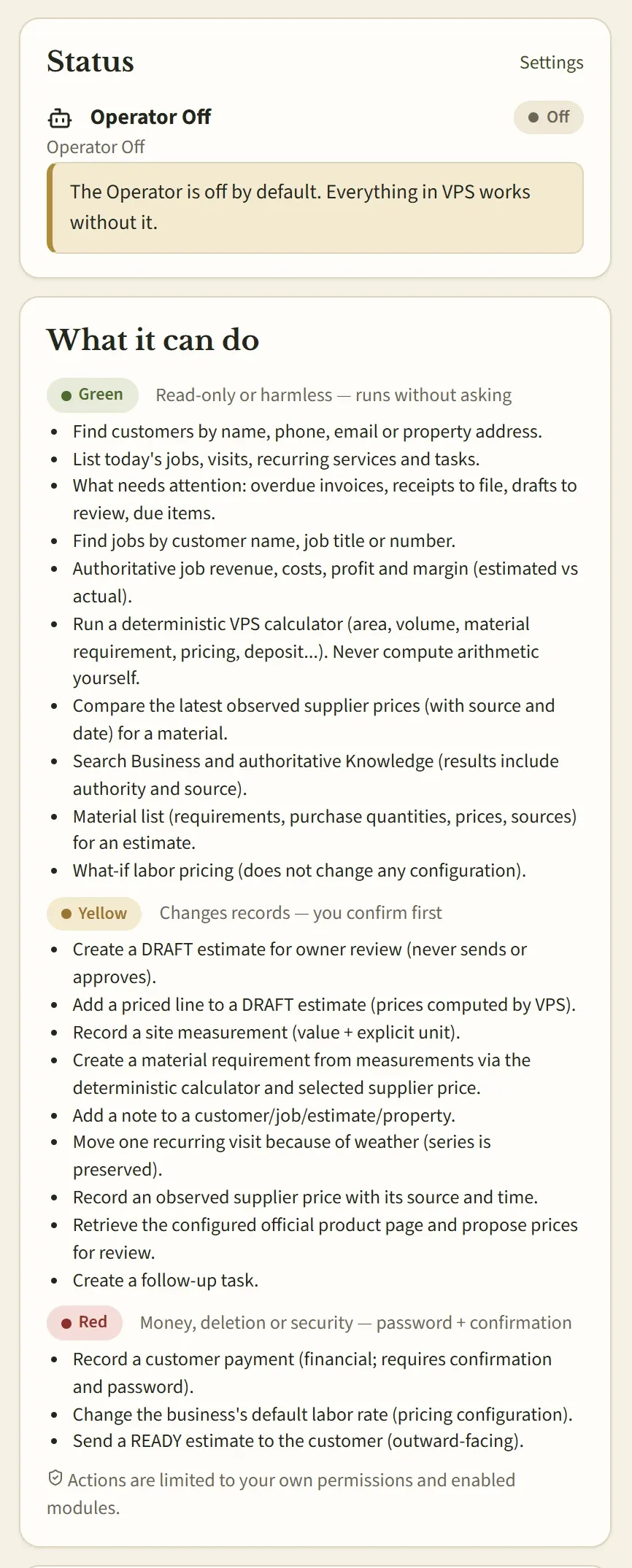
An optional assistant that works through the same rules as you.
- One assistant for the whole business
- Off by default — nothing depends on it
- Uses VPS's own calculations, never its own math
- Asks before it changes anything
Business Operator
An assistant that works for the business — never the other way around.
VPS is a complete business system first. The Business Operator is an optional layer on top: it can find things, explain them and prepare work for you, using the same rules and records you do.
One assistant for the whole business
A single Operator that understands customers, jobs, money, files and knowledge together — not a separate chatbot on every page.
Optional, and Off by default
VPS ships with the Operator Off. If it is unavailable or switched off, quotes, jobs, money and files keep working exactly the same.
VPS does the math
Totals, quantities, deposits and prices come from the same deterministic calculation engine the app uses. The Operator calls it; it never invents a number.
You stay in charge
It acts only with your permissions. Anything that changes a record waits for your confirmation; money and outward-facing actions also need your password. Every action is recorded.
Every Operator action takes the same path as yours
- Your request
- Your permissions
- Checked inputs
- Risk level
- Your confirmation
- The same VPS action
- Audit record
Availability today. The Operator is designed to run with a model on your own PC, and VPS only enables models that pass its certification tests. That certification is still in progress, so current builds ship with the Operator Off. Everything else on this page works without it.
Local-first · Your data
Your business runs on your computer. Your records stay yours.
VPS is built for one-PC, local operation. The business keeps working without an internet connection to an AI service, and you decide where your data goes.
What runs on your Windows PC
- VPS desktop app
- VPS server (a Windows service)
- PostgreSQL business database
- Filing Cabinet files
- Automatic backups
Optional, only if you set it up
- A second backup location — USB drive, NAS or synced folder
- An email provider for sending documents
Your database, on your PC
VPS installs and manages its own PostgreSQL database on your Windows computer. The VPS server and database answer only on that computer.
Your files, kept locally
Receipts, photos, contracts and generated documents live in the Filing Cabinet on the same PC, in a data folder limited to the VPS service and administrators.
No cloud AI in the core
Quotes, jobs, scheduling, invoicing and files never call a cloud AI service. The optional Operator is designed around a local model.
Take everything with you
Export every record your business owns plus the original files, in open formats (JSON and the originals). Your configuration exports too.
Backups you control
Daily verified backups on the PC, an optional second copy on a drive or folder you choose, and restore from inside the app.
Connections only when you choose
Optional services, such as sending documents through an email provider you set up, stay off until you configure them — and VPS says plainly when something isn't connected.
Local-first means you hold your data — and the responsibility for the computer it lives on. VPS warns you on the dashboard while backups exist only on that PC, and recommends a second copy somewhere else.
One product, shaped to your business
VPS adapts to your kind of service work — without becoming custom software.
Every business runs the same tested VPS. What changes is configuration: the kinds of work you turn on and the services, prices and rules you set. Improvements reach everyone, and your settings stay yours.
- Foundation
Service Core
Customers, estimates, jobs, calendar, money, files, documents, knowledge and reports — shared by every VPS business.
- Industry capabilities
Landscape & Property Services
Site assessments, work areas, measurements and material calculations for work done on properties.
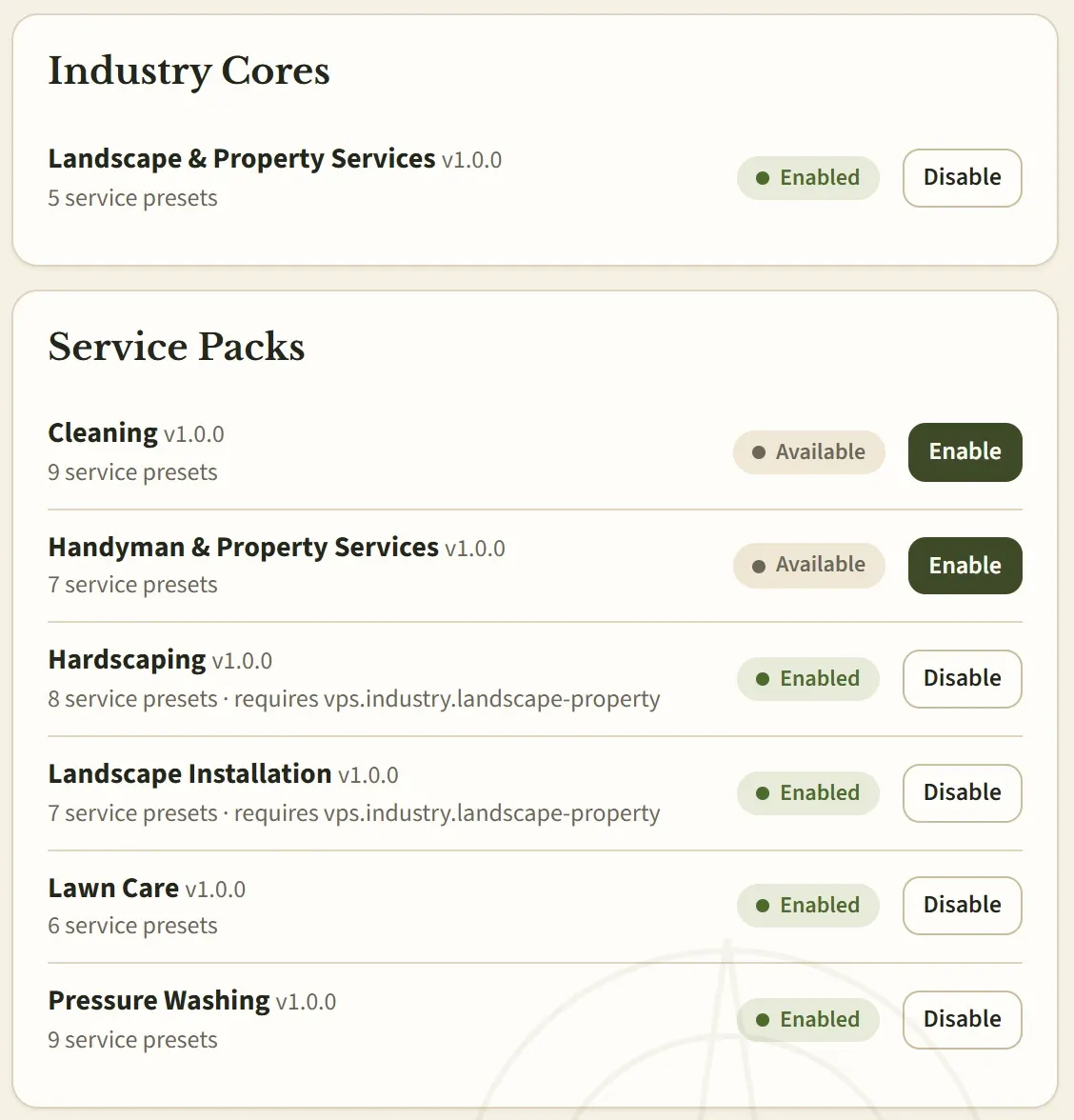
- Service Packs
Turn on the kinds of work you do
- Lawn Care
- Landscape Installation
- Hardscaping
- Pressure Washing
- Cleaning
- Handyman & Property Services
Each pack adds ready-made services, pricing methods, calculators, checklists and setup questions.
- Your business
Your configuration
Your services and prices, deposit rules, payment methods, documents and branding — set in a guided setup wizard, or delivered as a reviewed configuration package. No code changes, ever.
Product tour
The real VPS desktop app
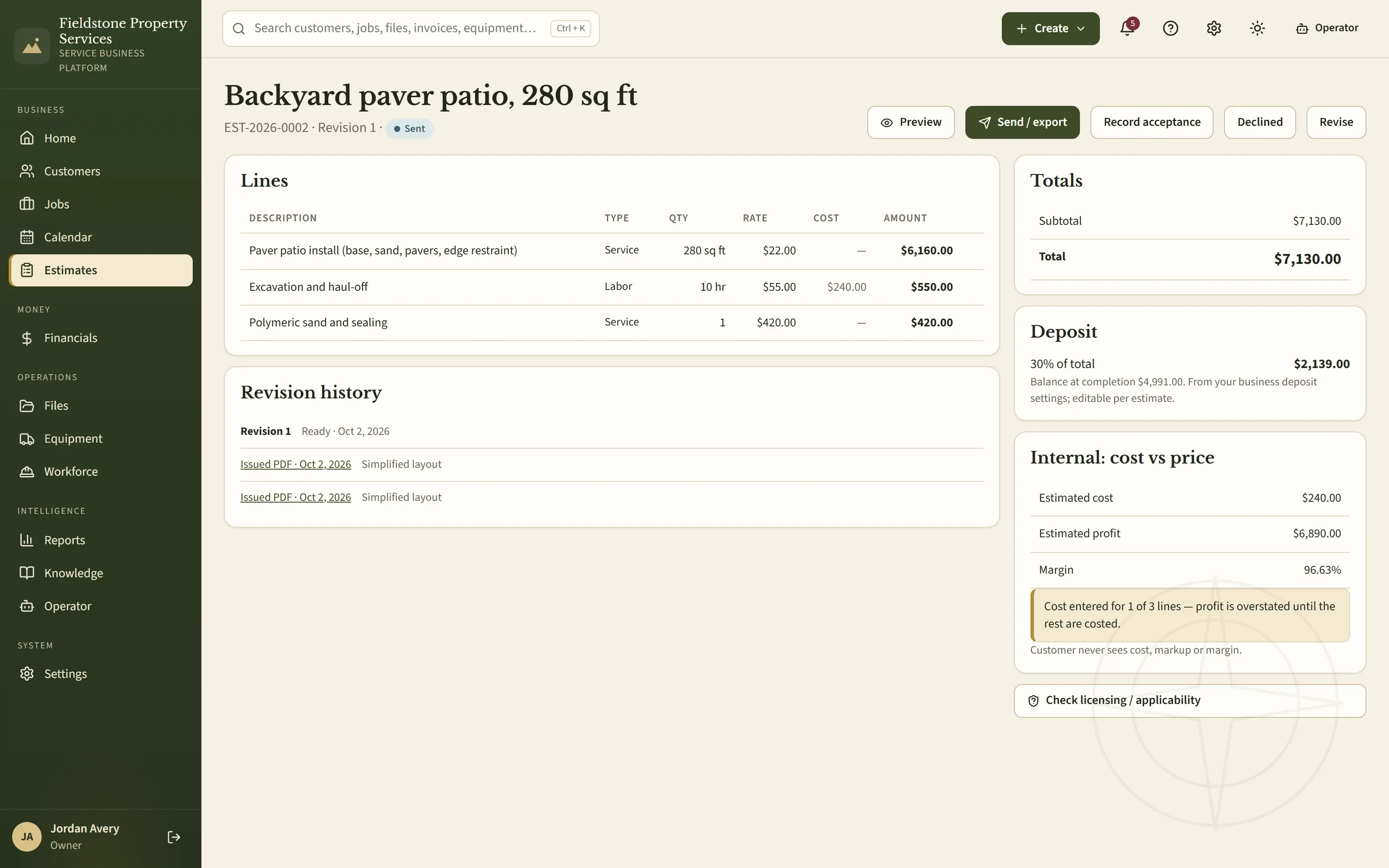
These are screens from the current Windows build, shown unaltered with a fictional example business — no mock-ups.
Estimates that explain themselves
Service, labor and material lines with quantities and rates, revision history, issued PDFs, totals and the deposit your rule produces — with internal cost kept separate from the customer price.
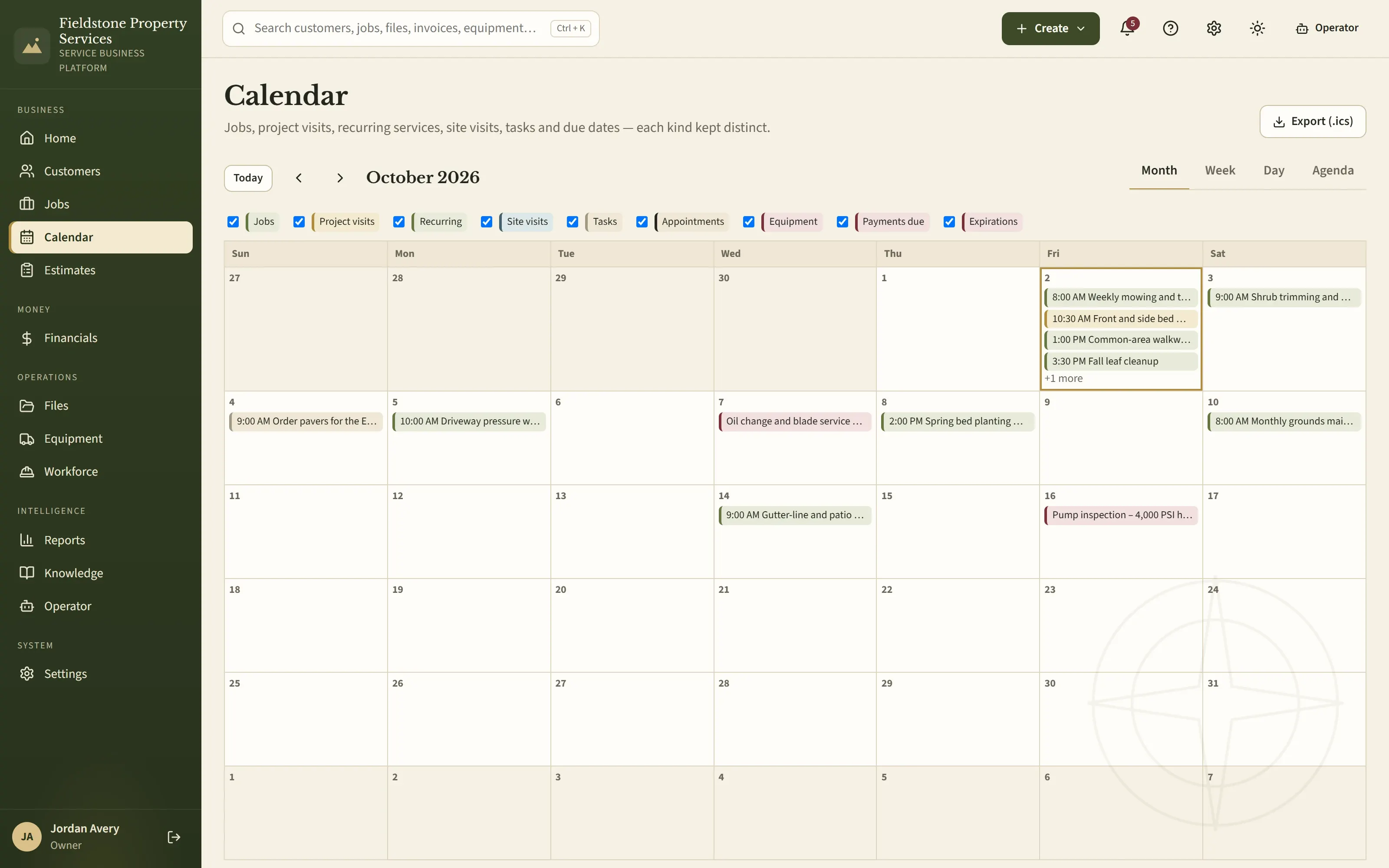
One calendar for every kind of appointment
Jobs, project visits, recurring services, site visits, tasks, equipment service and payments due — each kept distinct, in month, week, day or agenda view.
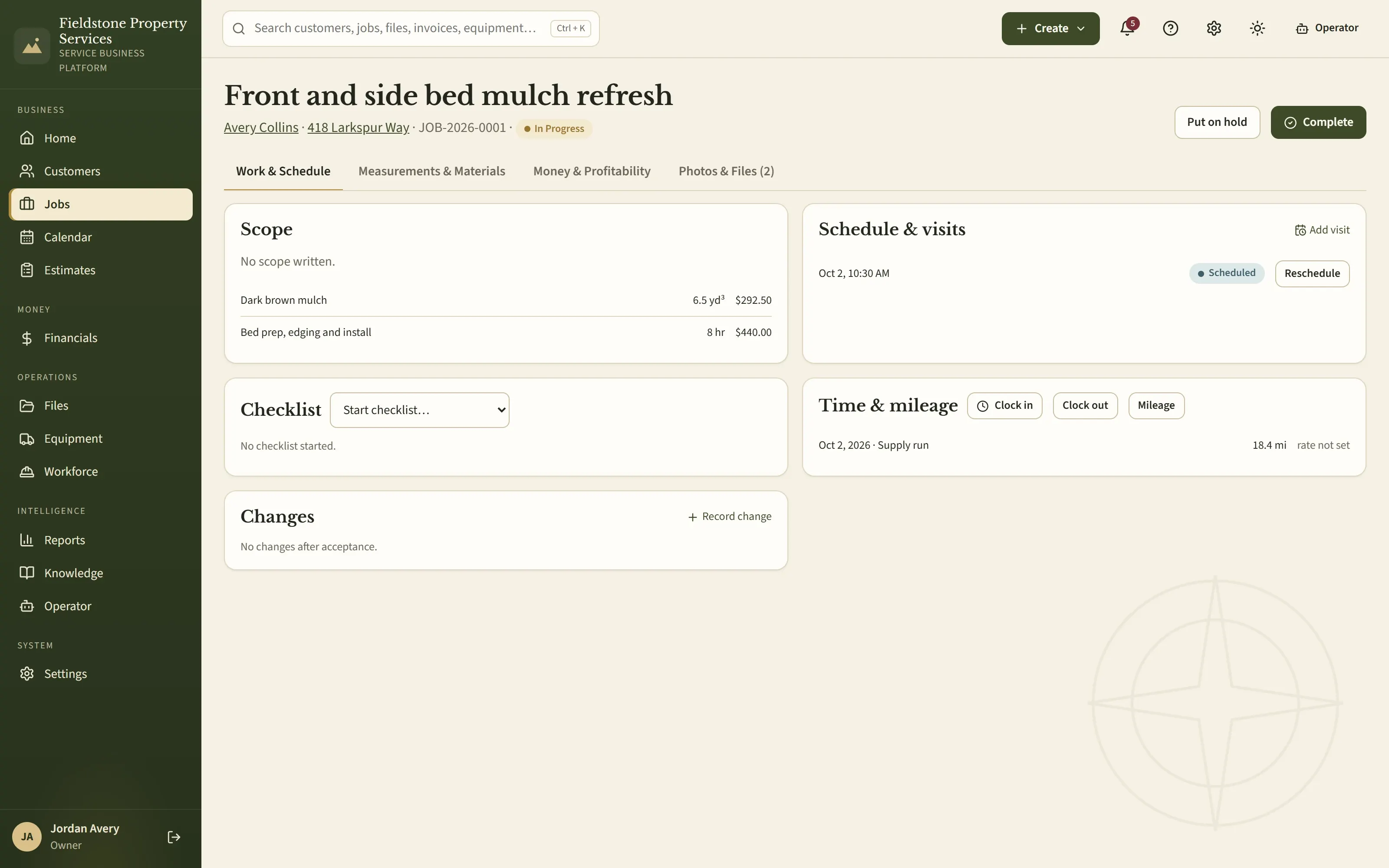
Jobs that carry the whole story
Scope and materials from the accepted estimate, schedule and visits, checklist, time and mileage, change records, money and profitability — on one job.
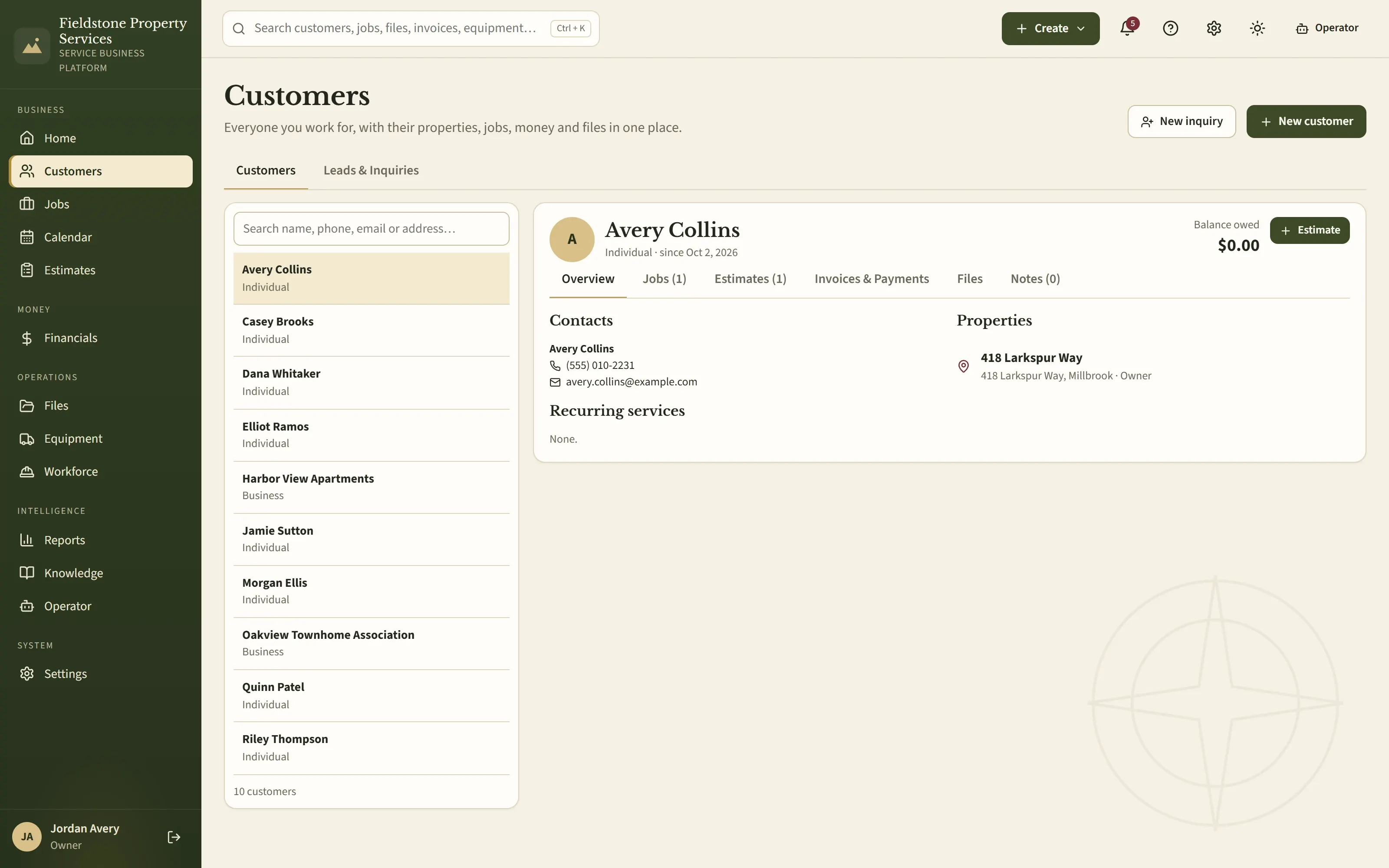
Every customer, with the whole relationship
Contacts, properties, recurring services, jobs, estimates, invoices, payments, files and notes for each customer — with the balance owed right at the top.
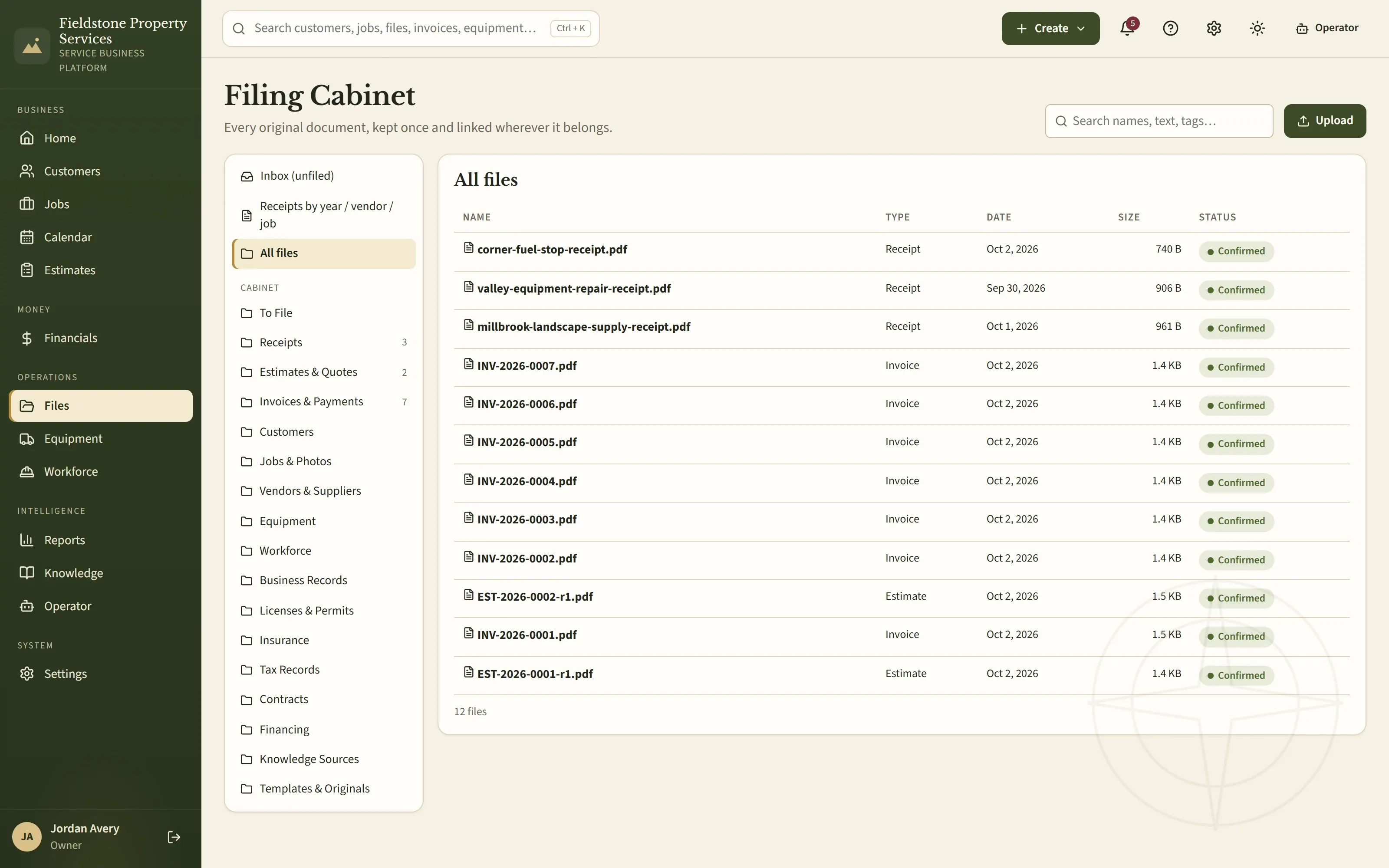
A Filing Cabinet, not an attachment pile
Receipts, invoices and estimates filed into business sections, each original kept once and linked to the customer, job, vendor or expense it belongs to.
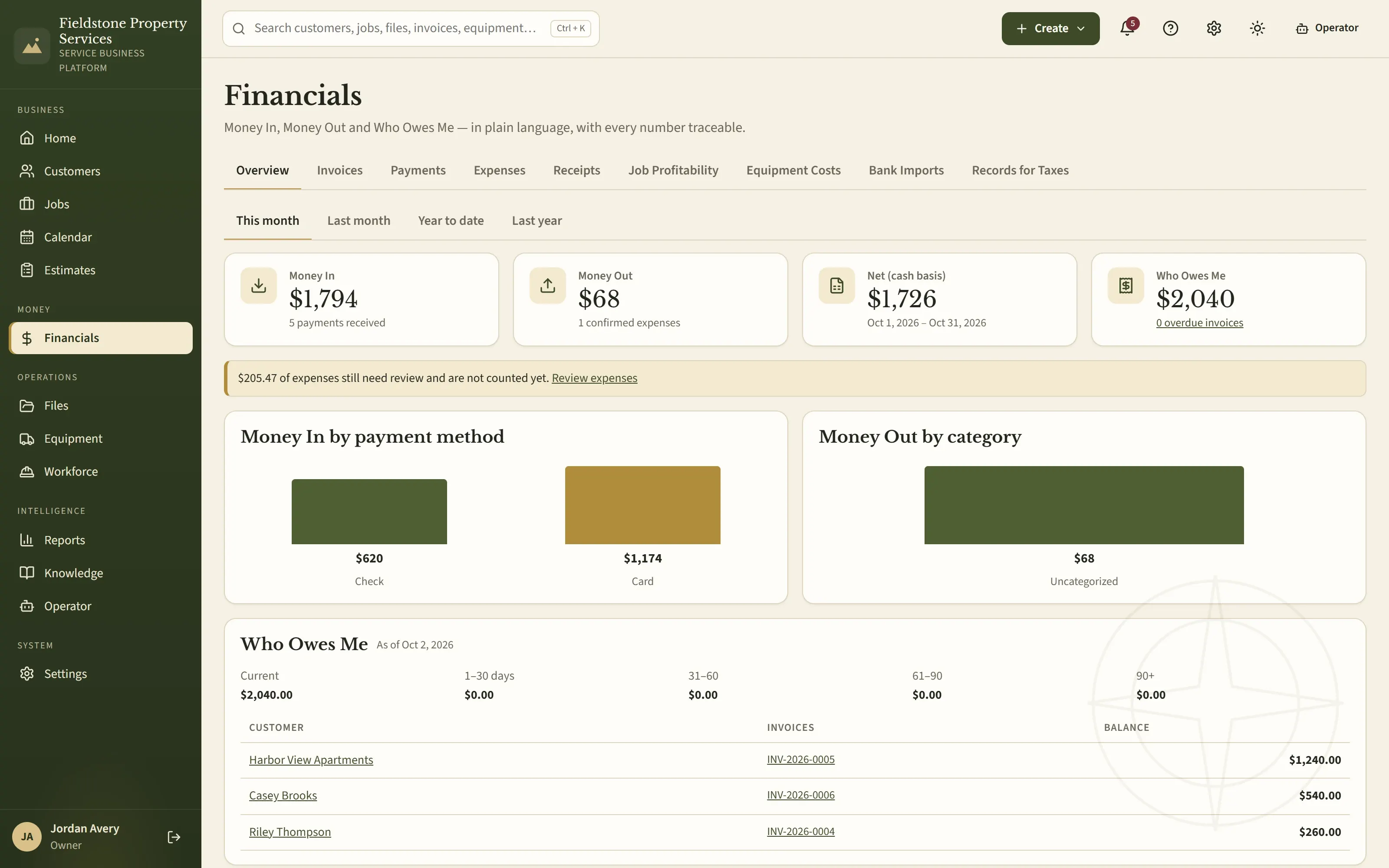
Money in plain language
Money In, Money Out, net and Who Owes Me, with payment-method and category breakdowns and aging — every number traceable to its records.
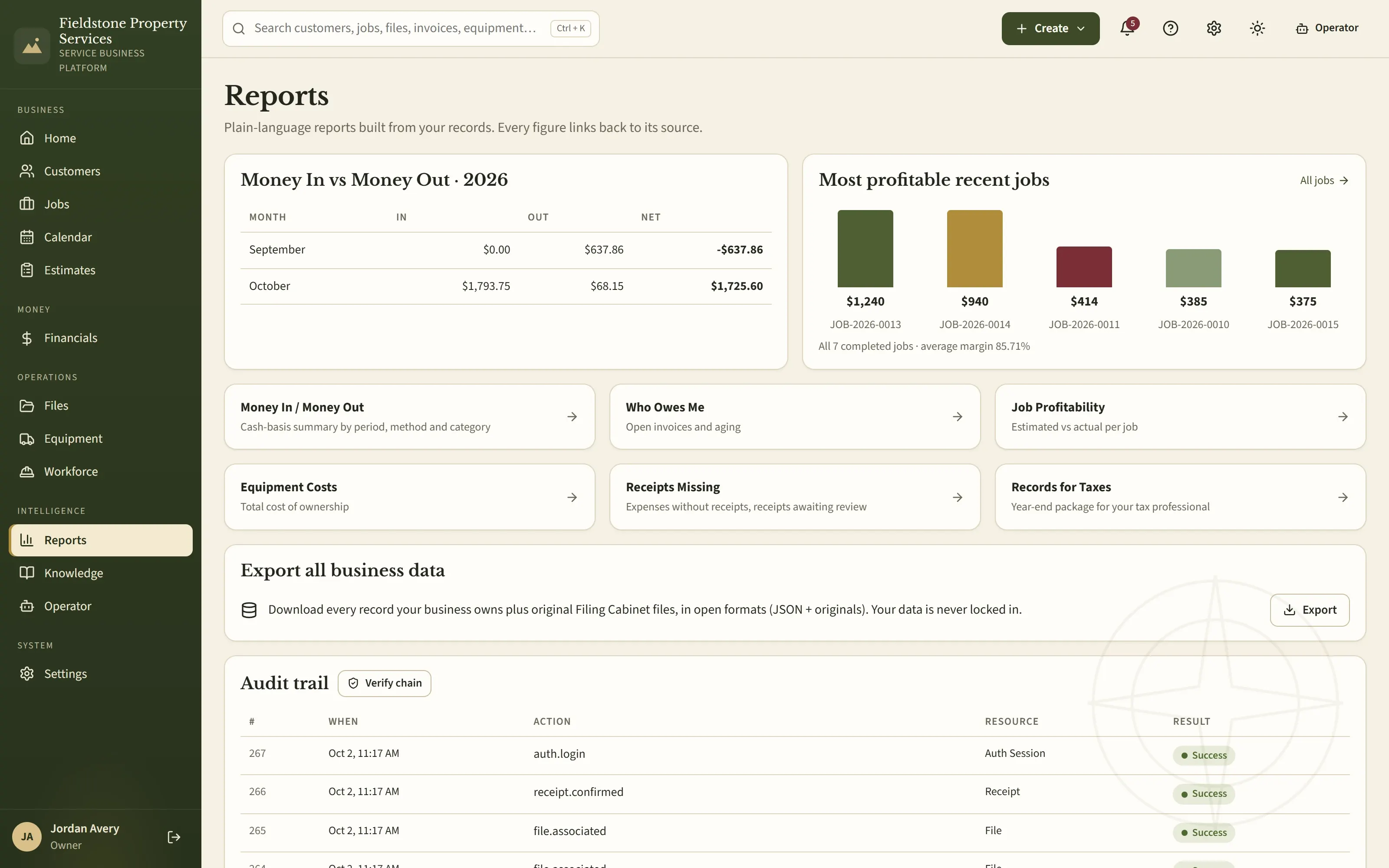
Reports built from your records
Money in vs. money out by month, the most profitable recent jobs, receipts missing, records for taxes, a full business export and a verifiable audit trail.
Reliability & recovery
Built for the day something goes wrong.
When a business keeps its own data, backups can't be an afterthought. VPS handles them without being asked — and shows you exactly where they are.
Automatic, verified backups
VPS backs up every record and Filing Cabinet file by itself each day, then reads the backup back to check it before counting it.
A second copy off the PC
Point VPS at a USB drive, a NAS share or a folder your cloud storage syncs. It copies every backup there and checks each copy.
Restore from the app
Choose a checked backup and confirm. VPS saves a safety copy of your current data first, and puts it back if anything goes wrong.
Move to a new PC
A fresh installation can restore the business from a backup folder on its very first screen — no command line required.
Updates that protect your data
Before an update changes the database, VPS makes and checks a backup. An older version will refuse newer data rather than damage it.
Your data, exportable
Export all business records with their original files at any time, in open formats.
Support without exposure
When you need help, create a support package with versions, checks and status — no customer names, receipts, financial details or passwords. You download it and decide whether to send it.
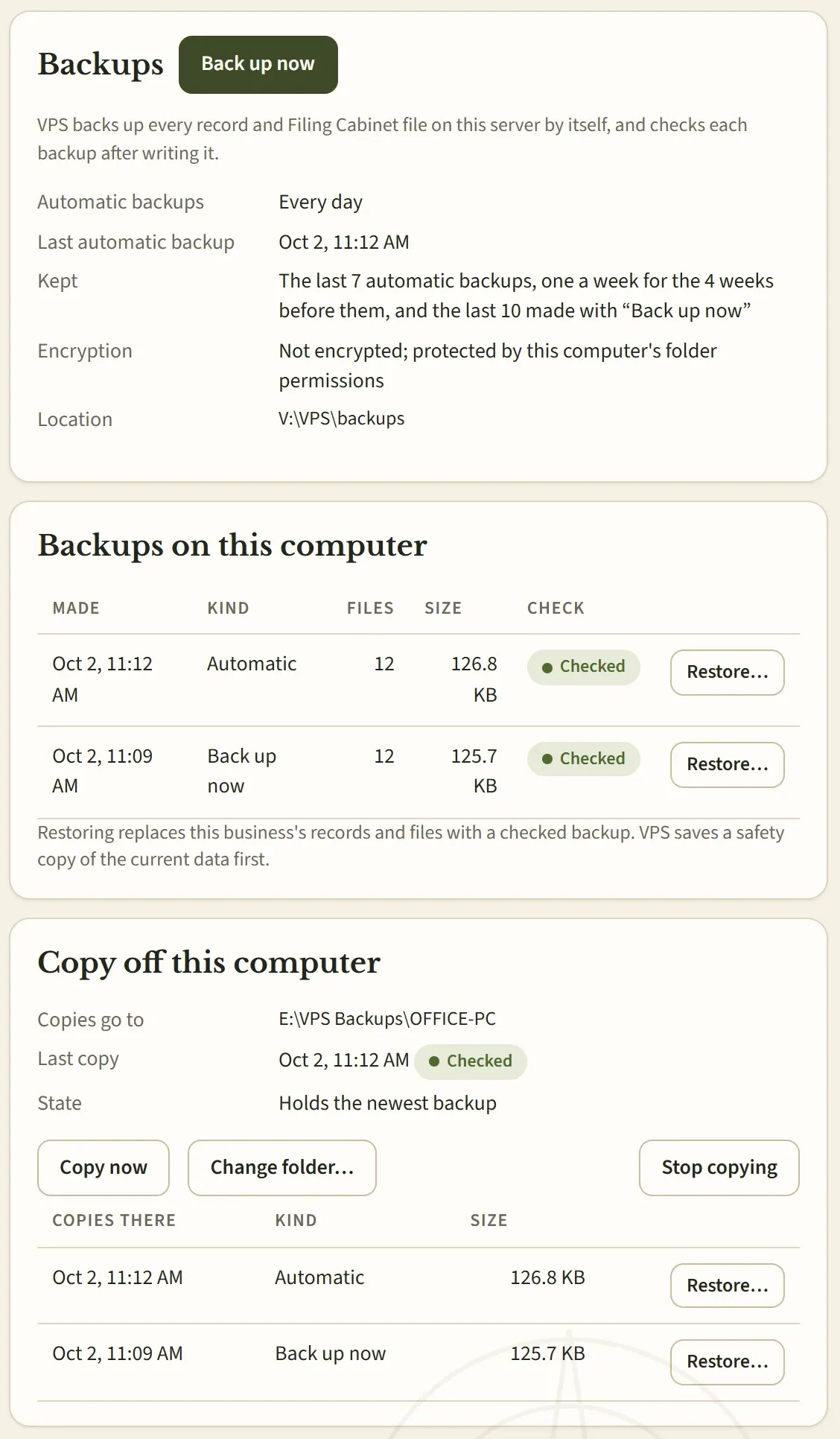
Technical details
- Kept on the PC: the last 7 automatic backups, one a week for the 4 weeks before them, the last 10 manual backups, and backups made before updates and restores.
- Each backup reads the database as one consistent snapshot, so it can run while people work.
- Filing Cabinet files are stored once by content and referenced, so daily backups don't duplicate years of photos.
- Off-PC copies are incremental, retried while a drive or share is unreachable, and keep their own history — wiping the PC's backup folder never deletes them.
- Backups are protected by the data folder's Windows permissions. They are not encrypted today, so keep an off-PC copy somewhere only you can reach.
Who it's for
Made for real-world service businesses.
Owner-operators and small crews who quote, schedule and invoice work at their customers' properties — and want one dependable system instead of five.
Lawn care & maintenance
Mowing, edging, cleanups and recurring visits that move with the weather.
Landscape installation
Mulch, sod, soil, plantings and bed renovations priced from measurements.
Hardscaping
Paver patios, walkways, gravel areas, edging and fire-pit areas (non-structural).
Pressure washing
Driveways, sidewalks, siding, decks, fences and house washing by area or by job.
Cleaning
Residential, deep, recurring, move-in/move-out, turnover, office and commercial cleaning.
Handyman & property services
Repairs, maintenance, installations, punch lists and minor exterior projects.
Similar field-service work
Businesses that measure, quote, schedule, complete and bill work on location can shape VPS around their services.
VPS does not currently include modules for licensed specialty trades such as electrical, plumbing, HVAC or roofing.
VPS Service Business Platform
Run the business the way it actually works.
One system for customers, quotes, jobs, scheduling, money, files and knowledge — on your own PC, with AI as an option instead of a dependency.
- Platform
- Windows desktop, installed on one PC
- Status
- In release preparation
- Pricing
- Announced at launch
- Early access
- Registration opens on this page before launch
Early-access registration is not open yet — when it opens, it will be right here. Until then, see exactly what you'd be getting.
Also from VPS
Free Business Tools
Small, free utilities for specific jobs. They're separate websites and don't require VPS. More are on the way.